Gamdom is an online gaming platform known for casino-style games, esports markets and cryptocurrency features. For players in the United Kingdom, downloading an Android app requires extra care: an APK may be offered outside Google Play, and an app’s availability does not automatically mean the service is authorised for UK gambling. This guide explains how to assess the download, protect your device and understand the account and cashier steps before playing.
Check whether Gamdom is suitable for you in the UK
Before looking for an APK, check the current terms on Gamdom’s official website, including its list of restricted countries and the rules that apply to UK residents. Availability can change, and access from the UK does not by itself establish that a gambling operator holds a UK Gambling Commission licence. You can verify a licence using the Commission’s public register. If the operator is not licensed for the UK, do not treat it as a UK-regulated casino.
UK rules also matter when it comes to age and consumer protection. Gambling is for adults aged 18 or over. A licensed UK operator must provide protections such as identity checks, safer-gambling tools and complaint routes. If a service is not subject to UK regulation, you may not have the same safeguards or access to the same dispute process. Consider these differences before creating an account, depositing money or installing software.
How to find and download the official APK
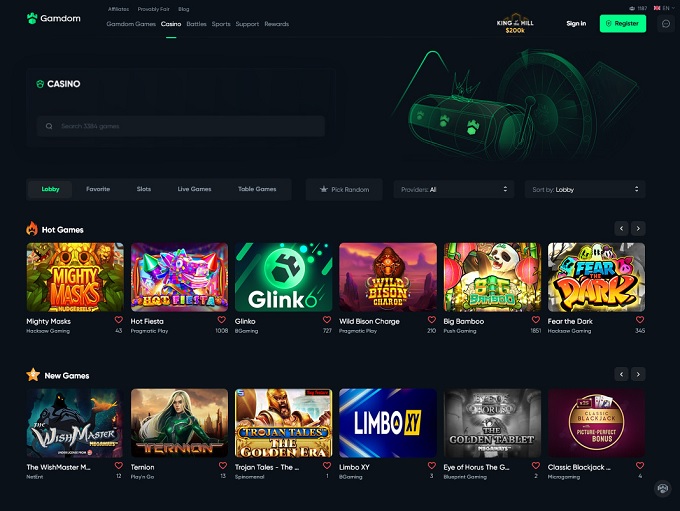
If Gamdom currently provides an Android APK, start from its official website rather than an advert, message-board post or third-party download directory. Search engines can surface imitation pages, and a file labelled “Gamdom” is not proof that it came from the operator. Check the web address carefully, use a secure connection and follow only the download instructions published on the site itself.
- Open the official site. Type the address yourself or use a trusted bookmark. Avoid links in unsolicited emails, social-media messages and pop-up ads.
- Locate the Android download information. Confirm that the page specifically identifies the file as an Android app or APK. If there is no official download page, do not substitute a file from an unofficial host.
- Review the details before downloading. Look for the version number, update date, file size and installation guidance. Missing or inconsistent details are reasons to stop.
- Download over a secure connection. Keep your browser and Android operating system updated. Do not install a file if the browser warns that it may be harmful.
- Check the file and permissions. Android may display a security warning for apps installed outside Google Play. Read it, and do not continue if the requested permissions seem unrelated to the app’s stated purpose.
APK installation steps vary by Android version and manufacturer. Some devices ask you to allow a browser or file manager to install unknown apps. If you choose to enable this setting for an official file, grant access only to the app used for that installation and switch it off again afterwards. Never disable broader security protections just to make an installer run.
Security checks before installing
An APK can contain software that steals login details, displays deceptive payment screens or accesses information on a device. Use a reputable mobile security tool if available, but remember that a clean scan is not a guarantee of safety. Compare the download page with Gamdom’s official support information, and contact support through a verified channel if you are unsure whether a file is genuine.
- Do not share your account password, one-time codes or wallet recovery phrase with anyone claiming to help with installation.
- Use a unique password and enable any available account security features.
- Keep your phone’s operating system, browser and security updates current.
- Remove an installer you do not recognise and avoid opening files sent by strangers.
- Do not use a VPN or other workaround to evade location restrictions or the operator’s terms.
APK, browser access or no installation?
Some casino platforms offer a mobile website that works in a browser. It can be a safer and simpler option than installing an APK, particularly when the app is not available through an established app store. A browser version still requires you to check the operator, its terms and the site address, but it avoids granting a separately installed app access to your device.
| Option | What to consider |
|---|---|
| Official APK | Install only if Gamdom currently publishes it through a verified channel. Review permissions, updates and device warnings. |
| Mobile browser | May avoid sideloading. Check the URL each time and keep your browser updated. |
| No access | If the service is unavailable, restricted or cannot be verified, do not seek unofficial downloads or bypasses. |
Account setup and cashier basics
If you decide to proceed and the service accepts you under its current terms, create an account only through the official platform. Enter accurate information and read the verification requirements, withdrawal rules, bonus conditions and any country-specific restrictions. Do not assume that a successful registration means you have passed identity checks or that every payment method will be available.
Before depositing, inspect the cashier carefully; Payment options, currencies, fees, minimums and processing times can vary. A cashier may also ask for identity or source-of-funds documentation, particularly before a withdrawal. Never deposit money you cannot afford to lose, and avoid borrowing to gamble. If the site’s licensing status or withdrawal conditions are unclear, the prudent choice is not to send funds.
For promotions, read the complete terms before opting in. A bonus may have eligibility limits, wagering requirements, game restrictions, maximum cash-out rules or an expiry date. Keep a copy of the terms shown when you claim it, because promotional conditions can affect withdrawals.
How bonus code entry works in the cashier
If a promotion is available to your account, the cashier may show a bonus-code or promo-code field during a deposit or offer-selection step. Enter the code exactly as provided, check that the promotion name and conditions appear before confirming, and make sure the offer is eligible for your country, account and chosen payment method. Some offers require opting in before depositing; others may not apply to every transaction. If the cashier does not confirm that the code has been accepted, do not assume a bonus has been added. Contact verified support before making a deposit, and never use a code obtained from an unofficial source.
Responsible play and practical limits
Casino games involve risk, and no app, strategy or bonus guarantees a profit. Set a spending limit before playing and treat deposits as entertainment costs, not a way to earn income. Decide in advance how long you will play, take breaks and stop when you reach either your time or money limit. If gambling is causing stress, debt or conflict, step away and seek support.
UK players can find information and help through organisations such as GamCare and the National Gambling Helpline. If you use an operator licensed in Great Britain, look for its safer-gambling controls, including deposit limits, time-outs and self-exclusion. Where those tools are unavailable or the operator’s regulatory status is uncertain, use independent support and consider blocking access to gambling services on your devices.
Frequently asked questions
Is there an official Gamdom APK?
That can change. Check Gamdom’s current official website and support pages. If they do not provide a verified Android download, do not rely on files hosted by third parties.
Can I install the APK from Google Play?
An APK is an Android installation file and may be distributed outside Google Play. If an app is not listed in the Play Store, that does not prove it is unsafe, but it does mean you should verify the source and assess the additional risks of sideloading.
Is Gamdom licensed for UK players?
Do not infer UK licensing from a website being reachable or an app being downloadable. Check the UK Gambling Commission’s public register and Gamdom’s current terms. If you cannot confirm that the service is authorised for your situation, do not deposit or play.
What should I do if Android blocks the installation?
Read the warning and stop if the file or source cannot be verified. Do not disable device security features or follow instructions from an unofficial guide to force the installation. Contact verified support or use a safer alternative.
Final checklist
Before downloading, confirm that the service is available and appropriate for you, verify the source, review the app’s permissions and understand the risks of installing outside an app store. Before registering or using the cashier, check licensing, account verification, payment and bonus terms. If any detail cannot be confirmed, avoid the download and do not transfer money.